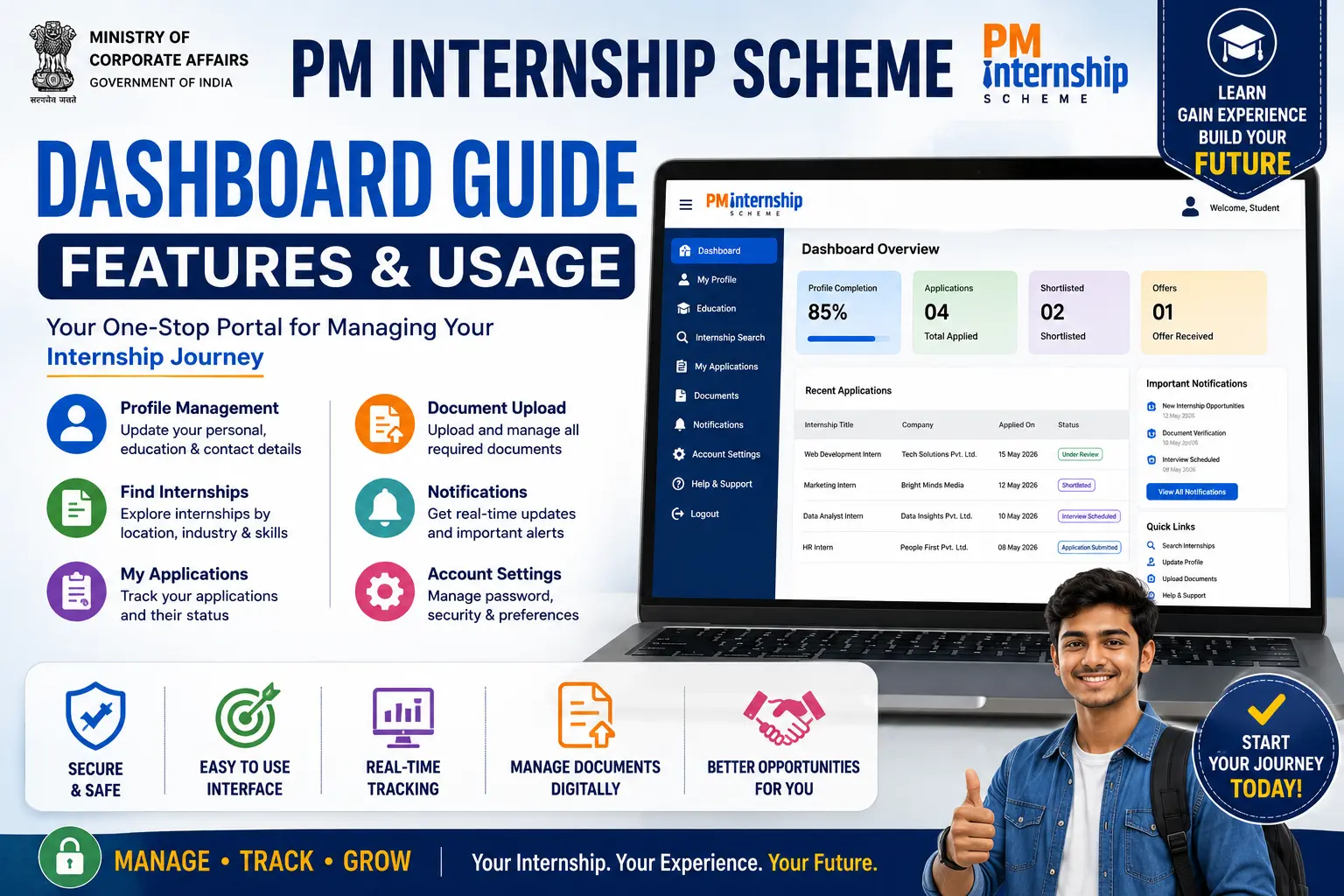
The PM Internship Scheme Dashboard Guide is essential for every applicant who has registered on the official PM Internship Scheme (PMIS) portal. The dashboard serves as your personal account center, allowing you to manage your profile, explore internship opportunities, submit applications, upload documents, track application status, receive internship offers, and monitor important notifications—all from one place.
Whether you are a first-time applicant or an existing user, understanding how to use the dashboard correctly can save time and help you avoid common mistakes during the application process. This comprehensive guide explains every major feature of the PM Internship Scheme Dashboard, how to access it, what each section does, and best practices for using it efficiently.
Important: The dashboard is available only after successful registration on the official PM Internship Scheme portal. Always access your account through the official Government website and never share your login credentials with anyone.
What is the PM Internship Scheme Dashboard?
The PM Internship Scheme Dashboard is a secure online portal where registered applicants can manage every stage of their internship journey.
Instead of visiting multiple pages, candidates can perform almost every task from a single dashboard.
The dashboard allows applicants to:
- Complete personal profile
- Update educational details
- Upload documents
- Search internships
- Apply for internships
- Track applications
- Accept internship offers
- Download letters (where available)
- View notifications
- Update account information
It acts as the central control panel throughout the internship process.
Why is the Dashboard Important?
The dashboard simplifies the application process by providing one place to manage all internship-related activities.
Major Benefits
- Easy profile management
- Faster application process
- Real-time application tracking
- Secure document storage
- Personalized internship recommendations
- Quick access to notifications
- Better transparency
How to Access the PM Internship Scheme Dashboard
Accessing the PM Internship Scheme Dashboard is the first step toward managing your internship applications, updating your profile, tracking your application status, and receiving important notifications. Once you have successfully registered on the official PM Internship Scheme portal, you can log in to your personal dashboard anytime using your registered credentials.
Follow the step-by-step process below to access your dashboard safely and securely.
Step 1: Visit the Official PM Internship Scheme Portal
Open your preferred web browser, such as Google Chrome, Microsoft Edge, Mozilla Firefox, or Safari, and visit the official PM Internship Scheme portal. Always ensure that you are using the genuine Government website to protect your personal information and avoid fraudulent websites.
Tip: Bookmark the official portal in your browser so you can access it quickly in the future.
Step 2: Click on the “Login” Button
On the homepage, locate the Login button, usually available in the top-right corner of the website. Click it to open the secure login page.
If you are a new applicant and have not created an account yet, complete the registration process before attempting to log in.
Step 3: Enter Your Login Credentials
On the login page, enter the information you used during registration.
Depending on the portal’s current authentication process, you may need to provide:
- Registered Mobile Number
- Registered Email Address (if applicable)
- Password
- CAPTCHA (if displayed)
Double-check all details before proceeding to avoid login errors.
Step 4: Complete OTP Verification (If Required)
For enhanced security, the portal may send a One-Time Password (OTP) to your registered mobile number or email address.
- Enter the OTP exactly as received.
- Complete the verification within the specified time.
- If the OTP expires, request a new one using the Resend OTP option.
Never share your OTP with anyone. Official support representatives will never ask for it.
Step 5: Access Your Dashboard
After successful verification, you will be redirected to your PM Internship Scheme Dashboard.
From your dashboard, you can:
- Complete or update your profile
- Upload required documents
- Search available internship opportunities
- Apply for internships
- Track application status
- View interview updates
- Check notifications and announcements
- Manage your account settings
The dashboard serves as your personal control panel throughout the internship application and selection process.
Devices You Can Use to Access the Dashboard
The PM Internship Scheme Dashboard is designed to work across multiple devices, allowing applicants to manage their accounts conveniently.
You can access the dashboard using:
- Desktop Computers
- Laptop Computers
- Android Smartphones
- iPhones (iOS)
- Tablets
For the best browsing experience, use the latest version of a supported browser and ensure you have a stable internet connection.
Best Browsers for the PM Internship Scheme Dashboard
To avoid technical issues, use an updated browser such as:
- Google Chrome
- Microsoft Edge
- Mozilla Firefox
- Apple Safari
Using an outdated browser may result in login problems, page loading issues, or incomplete functionality.
Safety Tips While Accessing Your Dashboard
Follow these simple precautions to keep your account secure:
- Access only the official PM Internship Scheme website.
- Verify the website address before entering your login details.
- Never share your password or OTP with anyone.
- Avoid logging in through public or shared computers.
- Log out after each session, especially when using a shared device.
- Keep your browser and operating system updated.
- Use a strong and unique password for your account.
Troubleshooting Login Issues
If you cannot access your dashboard, try the following:
- Verify that your mobile number or email address is entered correctly.
- Ensure you are using the correct password.
- Clear your browser’s cache and cookies.
- Try logging in with another supported browser.
- Check your internet connection.
- Wait a few minutes if the portal is undergoing maintenance or experiencing heavy traffic.
- Use the Forgot Password option if you cannot remember your password.
Most login-related issues can be resolved by following these basic troubleshooting steps.
PM Internship Scheme Dashboard Overview
After login, applicants generally see several sections depending on their profile status and the current application cycle.
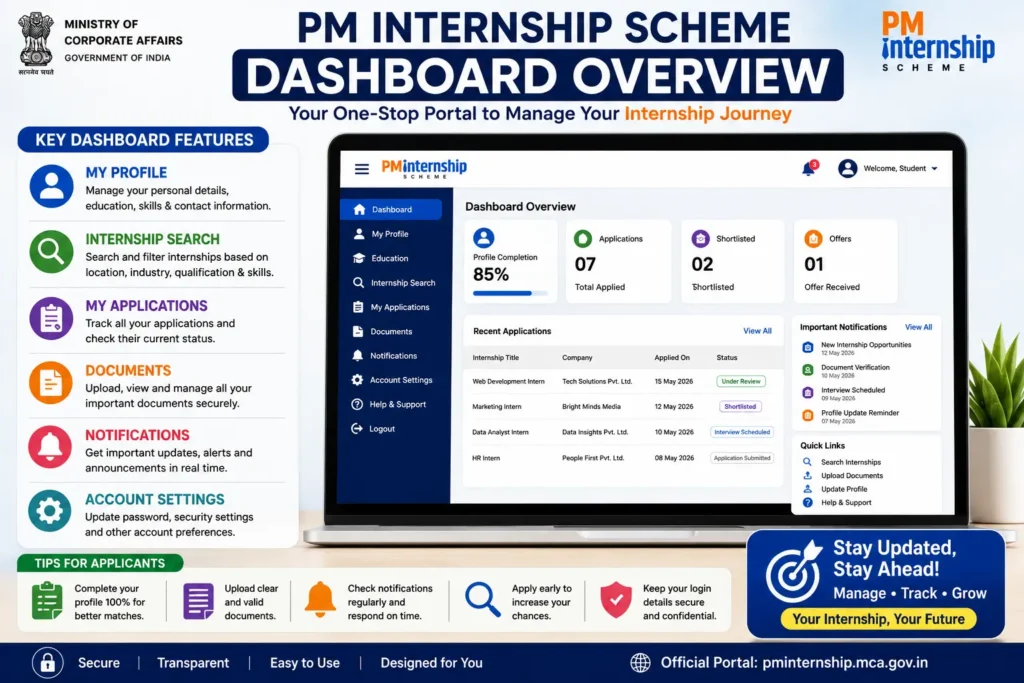
Typical dashboard sections include:
- Dashboard Home
- Profile
- Internship Opportunities
- Applied Internships
- Documents
- Notifications
- Account Settings
- Help & Support
The exact layout may change as the portal is updated.
Dashboard Home
The Dashboard Home provides a quick summary of your account.
It may display:
- Welcome message
- Profile completion percentage
- Active internship opportunities
- Application summary
- Pending actions
- Recent notifications
- Important announcements
Applicants should review this section regularly for updates.
Profile Management
One of the most important dashboard features is profile management.
Applicants can update:
Personal Information
- Name
- Date of Birth
- Gender
- Aadhaar-linked information (where applicable)
- Address
Educational Details
Candidates can add or edit:
- Class 10
- Class 12
- ITI
- Diploma
- Graduation
- Post Graduation
- Skills
- Certifications
Contact Information
Users can manage:
- Mobile Number
- Email Address
Keeping these details updated helps ensure that important notifications are received.
Profile Completion Percentage
Many dashboards display a profile completion indicator.
A fully completed profile improves your chances of receiving relevant internship recommendations and reduces delays caused by missing information.
Before applying, make sure all required fields and documents are complete.
Document Upload Section
Applicants can securely upload required documents, which may include:
- Aadhaar Card
- Photograph
- Educational Certificates
- Mark Sheets
- Bank Account Details
- Category Certificate (if applicable)
- Disability Certificate (if applicable)
Upload only clear and valid documents in the prescribed format and size.
Internship Opportunities Section
This section lists internships that match your profile.
You can filter opportunities based on:
- Qualification
- Skills
- State
- District
- Industry
- Company
- Internship Duration
Read each listing carefully before applying.
Apply for Internships
The dashboard enables online applications in a few simple steps.
Process
- Open an internship listing.
- Review eligibility requirements.
- Check the internship location and duration.
- Submit your application.
- Receive confirmation after successful submission.
Apply only to internships that align with your qualifications and interests.
Application Status Tracking
The dashboard allows applicants to monitor their applications in real time.
Common status updates may include:
- Submitted
- Under Review
- Shortlisted
- Interview Scheduled
- Selected
- Offer Issued
- Not Selected
Checking the status regularly helps you respond promptly if additional information is requested.
Internship Offer Management
If selected, applicants may receive internship offers through the dashboard.
Depending on the portal workflow, you may be able to:
- View offer details
- Accept or decline the offer
- Download the offer letter (if provided)
- Check joining instructions
Read the offer carefully before accepting.
Notifications Section
The notification center keeps applicants informed about important updates, such as:
- Application status changes
- Document verification
- Interview schedules
- New internship opportunities
- Portal announcements
- Deadlines
Do not ignore notifications, especially during active application periods.
Account Settings
Applicants can manage account preferences through the settings section.
Common options include:
- Change password
- Update contact details
- Manage security settings
- Review account information
Use a strong password and avoid sharing your login credentials.
Dashboard Security Tips
Protect your account by following these best practices:
- Use only the official portal.
- Never share your OTP.
- Log out after each session, especially on shared devices.
- Keep your password confidential.
- Avoid accessing the portal through unknown links.
- Update your browser regularly.
PM Internship Scheme Dashboard Common Issues and Solutions
Dashboard Not Opening
Possible causes:
- Slow internet
- Browser cache
- Portal maintenance
Solution: Refresh the page, clear cache, or try again later.
Application Not Visible
Possible causes:
- Temporary server delay
- Application not submitted successfully
Solution: Refresh the dashboard and verify your submission history.
Documents Not Uploading
Possible causes:
- Unsupported file format
- File size exceeds the limit
- Slow internet connection
Solution: Compress the file if necessary, use the accepted format, and upload again.
Profile Changes Not Saving
Possible causes:
- Session timeout
- Browser issue
Solution: Log in again and save the changes after refreshing the page.
Best Practices for Using the Dashboard
To make the most of the dashboard:
- Complete your profile before applying.
- Upload clear documents.
- Review internship descriptions carefully.
- Check notifications daily.
- Update contact information whenever it changes.
- Track application status regularly.
- Log out after each session.
Advantages of Using the PM Internship Scheme Dashboard
The dashboard provides several benefits:
- Centralized account management
- Easy internship search
- Faster online application
- Real-time application tracking
- Secure document management
- Personalized recommendations
- Improved transparency
- Better communication with applicants
PM Internship Scheme Dashboard Features Explained (Complete Menu Guide)
The PM Internship Scheme Dashboard is designed to help applicants manage every stage of their internship journey from one centralized portal. Understanding each dashboard menu helps candidates complete their applications correctly and avoid unnecessary delays.
1. Dashboard Home
This is the first screen after logging in.
It generally provides a quick overview of:
- Profile completion percentage
- Total applications submitted
- Internship recommendations
- Pending actions
- Latest announcements
- Recent notifications
Applicants should review this section every time they log in.
2. My Profile
The My Profile section stores all personal information entered during registration.
Typical information includes:
- Full Name
- Date of Birth
- Gender
- Mobile Number
- Email Address
- Address
- Aadhaar-linked details (where applicable)
Always ensure that the information matches your official documents.
3. Educational Qualification
Candidates can view or update:
- Class 10 Details
- Class 12 Details
- ITI Qualification
- Diploma Information
- Graduation
- Post Graduation
- Professional Certifications
- Skills
Keeping educational information accurate improves internship matching.
4. Internship Search
The dashboard allows applicants to search internships using various filters.
Popular filters include:
- State
- District
- Company
- Industry
- Qualification
- Skill
- Internship Duration
Using these filters makes it easier to find relevant opportunities.
5. My Applications
This section displays every internship application submitted by the candidate.
Information may include:
- Application Date
- Internship Name
- Company Name
- Current Status
- Interview Updates
- Selection Result
Applicants should monitor this page regularly.
6. Document Center
The Document Center securely stores uploaded documents.
Common uploads include:
- Aadhaar Card
- Educational Certificates
- Passport-size Photograph
- Bank Account Details
- Category Certificate (if applicable)
- Disability Certificate (if applicable)
Always upload clear, readable, and valid documents.
7. Notifications
The notification section provides important updates such as:
- New internship opportunities
- Document verification requests
- Interview schedules
- Application status changes
- Portal announcements
- Important deadlines
Ignoring notifications may result in missed opportunities.
8. Account Settings
Applicants can manage account security by:
- Changing password
- Updating email address
- Updating mobile number (if permitted)
- Reviewing account activity
For better security, change your password periodically and avoid sharing login credentials.
Why Understanding Dashboard Features Matters
A complete understanding of the dashboard helps applicants:
- Complete their profiles correctly
- Find suitable internships faster
- Avoid missing important updates
- Track applications efficiently
- Improve their overall application experience
PM Internship Scheme Dashboard Tips to Increase Selection Chances
Many applicants complete registration but miss opportunities because their dashboard is incomplete or they fail to respond to important updates. Following these best practices can improve your chances of being shortlisted.
Complete Your Profile 100%
An incomplete profile may reduce the visibility of your application during the matching process.
Before applying, ensure that:
- Personal details are complete.
- Educational information is accurate.
- Skills are updated.
- All mandatory documents are uploaded.
Upload High-Quality Documents
Poor-quality document uploads can delay verification.
Follow these guidelines:
- Scan documents clearly.
- Ensure all text is readable.
- Use accepted file formats.
- Stay within the maximum file size limit.
Apply Early
Many internship opportunities receive a large number of applications.
Applying early can provide benefits such as:
- Better visibility
- Reduced competition
- More available internship options
- Sufficient time for document correction if required
Keep Your Skills Updated
Whenever you complete a new course or certification, update your dashboard profile.
Examples include:
- Computer Skills
- Digital Marketing
- MS Office
- Programming Languages
- Artificial Intelligence
- Data Analytics
- Communication Skills
- Foreign Language Certifications
Updated skills help the system recommend more relevant internship opportunities.
Check Notifications Daily
Important updates may include:
- Interview invitations
- Additional document requests
- Application approval
- Internship offers
- Deadline reminders
Regularly checking notifications ensures you don’t miss time-sensitive actions.
Keep Contact Information Active
Always maintain access to your:
- Registered mobile number
- Registered email address
Many important communications are sent through these channels.
Prepare for Interviews
Some participating organizations may conduct interviews before making internship offers.
Prepare by reviewing:
- Your resume
- Academic projects
- Technical skills
- Communication skills
- General interview questions
Confidence and preparation can make a positive impression.
Stay Updated with Official Announcements
Application schedules, internship listings, and portal features may change over time.
Regularly reviewing official updates helps you:
- Stay informed about new opportunities.
- Understand revised guidelines.
- Avoid relying on outdated or unofficial information.
Avoid Common Dashboard Mistakes
Many applicants unintentionally reduce their chances by:
- Leaving mandatory fields incomplete
- Uploading blurred documents
- Ignoring portal notifications
- Using incorrect contact details
- Missing application deadlines
- Applying without reviewing eligibility
Avoiding these mistakes can make your application process smoother and more efficient.
Final Tips for Success
The PM Internship Scheme Dashboard is more than just a login portal—it is your primary workspace throughout the internship process. Keeping your profile complete, monitoring notifications, updating your skills, and applying promptly can help you make the most of available opportunities.
Combined with careful attention to official guidelines, these habits improve your overall experience and may increase your chances of securing a suitable internship.
You May Read More
- Internship Salary in India 2026: Top Companies, Salary Trends & Best Paid Internships
- PM Internship Scheme Login Problem Solution (Fix Errors Easily)
- PM Internship Scheme 2026 Apply Online: Registration, Eligibility, Last Date, Stipend, Documents & Selection Process
PM Internship Scheme Dashboard Guide 2026 FAQs with Detailed Answers (Latest Guide)
What is the PM Internship Scheme Dashboard?
It is the personal account section of the PM Internship Scheme portal where registered applicants manage their profile, applications, documents, and internship-related activities.
Can I edit my profile after registration?
Yes. Applicants can generally update profile information through the dashboard, subject to the portal’s rules and timelines.
How do I check my application status?
Log in to your dashboard and open the Applied Internships or similar section to view the latest status of your applications.
Can I upload documents after registration?
Yes. Required documents can usually be uploaded or updated through the dashboard before completing the application process, if permitted.
Why can’t I access my dashboard?
Possible reasons include incorrect login credentials, browser issues, temporary server maintenance, or internet connectivity problems.
Can I apply for multiple internships?
The ability to apply for multiple internships depends on the rules of the current application cycle. Always review the latest guidelines on the official portal.
Is the dashboard available on mobile devices?
Yes. The dashboard can generally be accessed through supported mobile browsers. The user experience may vary depending on the device and browser.
How often should I check my dashboard?
It is advisable to check your dashboard regularly during the application period to stay informed about notifications, application status updates, and any additional actions required.
Conclusion – PM Internship Scheme Dashboard Guide
The PM Internship Scheme Dashboard Guide helps applicants understand how to use the portal effectively throughout the internship process. From completing your profile and uploading documents to tracking applications and responding to internship offers, the dashboard is the primary hub for managing your participation in the scheme.
By keeping your information up to date, monitoring notifications, and following secure login practices, you can make the application process smoother and reduce the chances of missing important updates.