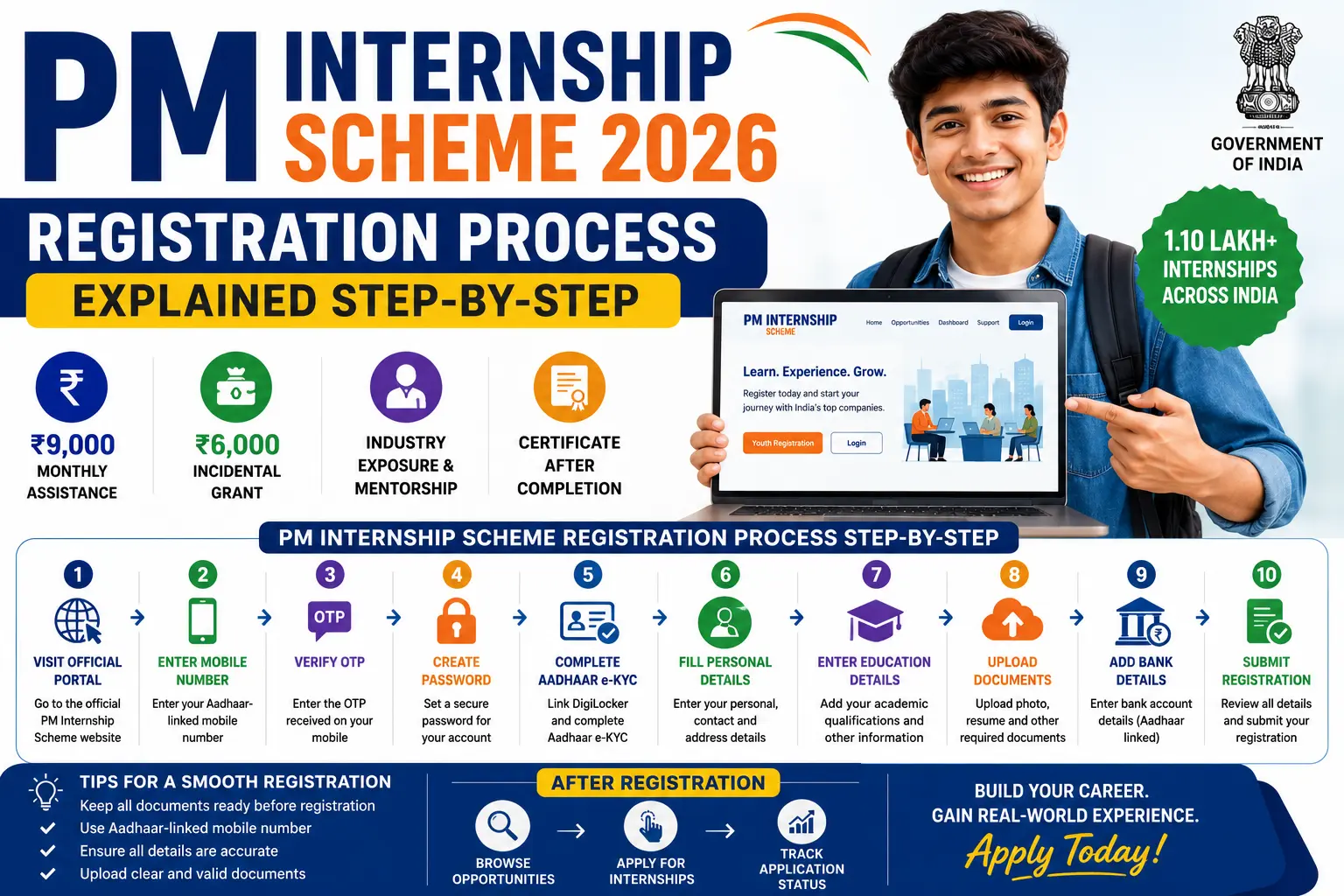
Prime Minister Internship Scheme (PMIS) 2026 is one of the largest internship initiatives launched by the Government of India to provide young people with practical industry exposure and workplace experience. Thousands of students and freshers are eager to apply, making it essential to understand the PM Internship Scheme registration process step by step.
The registration process is completely online and designed to be simple, transparent, and accessible. Candidates can register through the official PM Internship Scheme portal, complete Aadhaar-based verification, create their profiles, and apply for internship opportunities offered by top companies across India.
In this detailed guide, we explain the PM Internship Scheme registration process step by step, including eligibility requirements, documents needed, profile creation, internship application, and post-registration procedures.
What is PM Internship Scheme 2026?
The PM Internship Scheme (PMIS) is a government initiative announced under the Union Budget 2024–25 and implemented by the Ministry of Corporate Affairs (MCA).
The scheme aims to:
- Provide practical industry exposure
- Improve employability skills
- Offer hands-on corporate experience
- Connect youth with leading companies
- Support skill development
The programme plans to provide over 1.10 lakh internship opportunities and is currently extended through December 2026.
Selected interns receive:
- ₹9,000 monthly assistance
- ₹6,000 incidental grant
- Professional mentorship
- Completion certificate
Who Can Register for PM Internship Scheme?
Before starting the registration process, candidates should verify their eligibility.
Age Requirement
Applicants must be:
- Between 18 and 25 years old
Employment Condition
Candidates should:
- Not be engaged in full-time employment
Educational Qualification
Eligible candidates include:
- Class 10 Pass
- Class 12 Pass
- ITI Students
- Diploma Holders
- Graduates
- Postgraduates
- Final-Year Students
- Online Learning Students
- Distance Education Students
Documents Required Before Registration
Candidates should keep the following documents ready:
Mandatory Documents
- Aadhaar Card
- Aadhaar-linked Mobile Number
- Educational Certificates
- Passport-size Photograph
- Resume (PDF)
- Bank Account Details
- Aadhaar-linked Bank Account
- DigiLocker Account
Having these documents prepared in advance will make registration faster and smoother.
PM Internship Scheme Registration Process Step by Step
The PM Internship Scheme registration process can be completed in a few simple stages.
Step 1: Visit the Official PM Internship Portal
The first step is to visit the official PM Internship Scheme portal.
On the homepage, you will find various options related to:
- Registration
- Opportunities
- Dashboard
- Application Status
Click on:
This option is specifically designed for candidates seeking internship opportunities.
Step 2: Enter Mobile Number
After clicking on Youth Registration:
- Enter your 10-digit mobile number
Important:
- The mobile number should be linked to Aadhaar.
The portal uses this number for verification and communication.
Step 3: Verify OTP
An OTP (One-Time Password) will be sent to your registered mobile number.
Complete Verification
- Enter OTP
- Verify mobile number
Successful OTP verification allows you to proceed further.
Step 4: Create Login Credentials
After mobile verification:
Create a Password
Choose a secure password containing:
- Uppercase letters
- Lowercase letters
- Numbers
- Special characters
This password will be used for future logins.
Step 5: Login to Candidate Dashboard
Once registration is complete:
- Login using your mobile number
- Enter your password
You will be redirected to the PM Internship candidate dashboard.
The dashboard serves as your personal application center.
Step 6: Complete Aadhaar e-KYC Verification
This is one of the most important stages.
The PM Internship Scheme requires:
Aadhaar-Based e-KYC
Candidates must:
- Link DigiLocker
- Complete Aadhaar authentication
The e-KYC process verifies:
- Identity
- Date of birth
- Personal information
Step 7: Fill Personal Details
After verification, complete your profile by entering:
Personal Information
- Full Name
- Date of Birth
- Gender
- Address
- State
- District
- Contact Details
Ensure all information matches official documents.
Step 8: Enter Educational Details
Now provide academic information.
Educational Information
- Class 10 Details
- Class 12 Details
- ITI Details (if applicable)
- Diploma Details
- Graduation Details
- Postgraduation Details
Final-year students should enter their current academic status.
Step 9: Add Skills and Interests
The portal allows candidates to highlight:
Professional Skills
Examples include:
- Computer Skills
- Data Entry
- Communication Skills
- Technical Skills
- Digital Marketing
- Graphic Design
- Coding
- Accounting
Providing accurate skills helps companies shortlist suitable candidates.
Step 10: Upload Resume
Candidates must upload their resume.
Resume Guidelines
- PDF Format
- Clear and updated
- Professional layout
- Maximum size as per portal requirement
The portal may also automatically generate a standardized resume using profile data.
Step 11: Verify Bank Account Details
Candidates must enter:
Banking Information
- Account Holder Name
- Bank Account Number
- IFSC Code
The account should be:
- Active
- Aadhaar-linked
This is necessary for Direct Benefit Transfer (DBT).
Step 12: Review Profile Information
Before proceeding:
Carefully Check
- Personal Details
- Educational Details
- Uploaded Documents
- Bank Information
- Contact Information
Errors at this stage may affect future verification.
Step 13: Submit Registration
After verification:
Click “Submit”
Your candidate profile will be successfully created.
You can now access internship opportunities available through the portal.
Step 14: Browse Internship Opportunities
After registration, visit:
“Opportunities” Section
Candidates can search internships using filters such as:
- State
- District
- Sector
- Functional Area
- Company
Step 15: Select Internship Preferences
Candidates can choose internships based on:
- Skills
- Qualification
- Career Goals
- Preferred Location
The portal allows applicants to select:
Up to 5 Internship Preferences
Choose opportunities carefully to improve selection chances.
Step 16: Apply for Internship
After selecting preferences:
Click “Apply Now”
The application is submitted to the internship system for consideration.
Some companies may request additional information during this stage.
Step 17: Track Application Status
Candidates can monitor progress through:
“My Current Status”
The dashboard displays:
- Application Submitted
- Shortlisted
- Under Review
- Interview Scheduled
- Offer Received
Step 18: Receive Internship Offer
If selected:
- An internship offer will appear on the portal
The offer contains:
- Company Name
- Internship Duration
- Location
- Reporting Details
Step 19: Accept the Offer
Selected candidates must:
Click “Accept Offer”
Acceptance confirms participation in the internship programme.
Failure to accept within the deadline may result in cancellation.
Step 20: Join the Internship
After acceptance:
- Complete onboarding formalities
- Submit required documents
- Attend orientation sessions
The company confirms joining on the PMIS portal.
What Happens After Registration?
After joining:
Government Benefits Start
Interns become eligible for:
- Monthly Assistance
- Incidental Grant
- Mentorship
- Workplace Training
PM Internship Scheme Financial Assistance
Monthly Stipend
Interns receive:
₹9,000 Per Month
Breakup:
| Source | Amount |
| Government | ₹8,100 |
| Company | ₹900 |
Additional Grant
Eligible interns also receive:
₹6,000 Incidental Grant
Payment Schedule:
| Installment | Amount |
| First Tranche | ₹3,000 |
| Second Tranche | ₹3,000 |
Common Registration Mistakes to Avoid
Many candidates face issues due to avoidable mistakes.
Avoid These Errors
❌ Incorrect Aadhaar details
❌ Wrong mobile number
❌ Name mismatch
❌ Incomplete educational information
❌ Invalid bank details
❌ Poor-quality document uploads
❌ Selecting unrelated internship preferences
Tips for Successful PM Internship Registration
✅ Keep Documents Ready: Prepare all required documents before starting.
✅ Use Aadhaar-Linked Mobile Number: This helps complete OTP verification smoothly.
✅ Upload Professional Resume: A strong resume improves shortlisting chances.
✅ Double-Check Information: Verify every detail before submission.
✅ Apply Early: Early applications often provide access to more opportunities.
Benefits of Registering for PM Internship Scheme 2026
The PM Internship Scheme offers numerous advantages.
✅ Industry Exposure: Gain practical workplace experience.
✅ Financial Support: Receive ₹9,000 monthly assistance.
✅ Professional Mentorship: Learn from experienced industry professionals.
✅ Skill Development: Build technical and workplace skills.
✅ Career Growth: Improve employability and job prospects.
✅ Internship Certificate: Receive official certification after successful completion.
You May Like To Read More Helpful Guides:
- PM Internship Scheme Eligibility Criteria 2026: Full Details
- How to Apply for PM Internship Scheme 2026 (Step-by-Step Guide)
- PM Internship Scheme Government Announcement: Full Details
Frequently Asked Questions (FAQs) About PM Internship Scheme Registration Process 2026
How can I register for the PM Internship Scheme 2026?
To register for the PM Internship Scheme 2026, visit the official PM Internship portal, click on “Youth Registration,” verify your Aadhaar-linked mobile number through OTP, complete e-KYC, fill in your profile details, upload the required documents, and apply for internship opportunities.
What is the first step in the PM Internship Scheme registration process?
The first step is to visit the official PM Internship Scheme portal and click on the “Youth Registration” option. Candidates must then verify their mobile number using OTP authentication.
Is Aadhaar mandatory for PM Internship Scheme registration?
Yes, Aadhaar is mandatory for PM Internship Scheme registration. Aadhaar-based e-KYC verification is required to authenticate identity and enable Direct Benefit Transfer (DBT) payments.
Can I apply for PM Internship Scheme without DigiLocker?
DigiLocker is generally required for completing Aadhaar-based e-KYC verification and accessing verified documents during the registration process.
What documents are required for PM Internship Scheme registration?
Candidates typically need an Aadhaar Card, Aadhaar-linked mobile number, educational certificates, passport-size photograph, resume, bank account details, and DigiLocker access.
How many internship preferences can I select during registration?
Applicants can choose up to five internship preferences based on their qualifications, skills, interests, and preferred location.
Is there any registration fee for PM Internship Scheme 2026?
No, registration for the PM Internship Scheme is completely free. Candidates do not have to pay any application or registration fee.
Can final-year students register for PM Internship Scheme?
Yes, final-year students are eligible to register and apply for internships if they meet the age and other eligibility requirements.
Can distance learning students apply for PM Internship Scheme?
Yes, students pursuing online or distance education programmes can register and apply under the PM Internship Scheme.
How do I complete e-KYC for PM Internship Scheme?
Candidates must link their DigiLocker account and complete Aadhaar-based verification through the PM Internship portal to successfully finish e-KYC.
What happens after submitting the PM Internship Scheme registration form?
After registration, candidates can browse internship opportunities, select preferences, submit applications, and track their application status through the candidate dashboard.
How can I check my PM Internship Scheme application status?
Applicants can log in to their dashboard and use the “My Current Status” section to track shortlisting, interview updates, selection status, and internship offers.
How are candidates selected under PM Internship Scheme?
The portal creates a pool of eligible candidates, and companies shortlist applicants based on qualifications, skills, preferences, and internship requirements. Final selection is made by the participating companies.
Will I receive an offer letter after selection?
Yes, selected candidates receive an internship offer through the PM Internship portal. They must accept the offer within the specified time period.
How much stipend is provided under PM Internship Scheme 2026?
Selected interns receive a monthly financial assistance of ₹9,000, including ₹8,100 from the Government and ₹900 from the participating company.
What is the ₹6,000 incidental grant in PM Internship Scheme?
Eligible interns receive an additional incidental grant of ₹6,000, usually paid in two installments of ₹3,000 each after joining and completing specified milestones.
Can I edit my profile after PM Internship Scheme registration?
Certain profile details may be editable through the candidate dashboard before final application submission, depending on portal guidelines.
What are the common mistakes to avoid during PM Internship registration?
Common mistakes include entering incorrect Aadhaar details, uploading unclear documents, providing wrong bank information, using a non-linked mobile number, and selecting unsuitable internship preferences.
How long does the PM Internship Scheme registration process take?
If all documents are ready, candidates can usually complete registration, e-KYC verification, and profile creation within a short period of time.
Why is the PM Internship Scheme registration process important?
The registration process helps verify candidate eligibility, create a professional profile, match applicants with suitable internships, and ensure smooth stipend payments through the DBT system.
Conclusion – PM Internship Scheme Registration Process Step by Step 2026
Understanding the PM Internship Scheme registration process step by step can help candidates complete their applications smoothly and avoid unnecessary mistakes. The registration process is straightforward and includes mobile verification, Aadhaar e-KYC, profile creation, document upload, internship selection, and application tracking.
By following each step carefully and keeping documents ready, eligible students and freshers can take advantage of this valuable opportunity to gain real-world experience, develop professional skills, and receive financial assistance under the PM Internship Scheme 2026.